
Where is your energy going?
Follow available measurements of grid import, export, generation, battery and consumption.
See what your installation is doing on your phone or laptop: available energy flows, battery status, history and configured notifications.
An authorised user can open the GX interface through Remote Console.
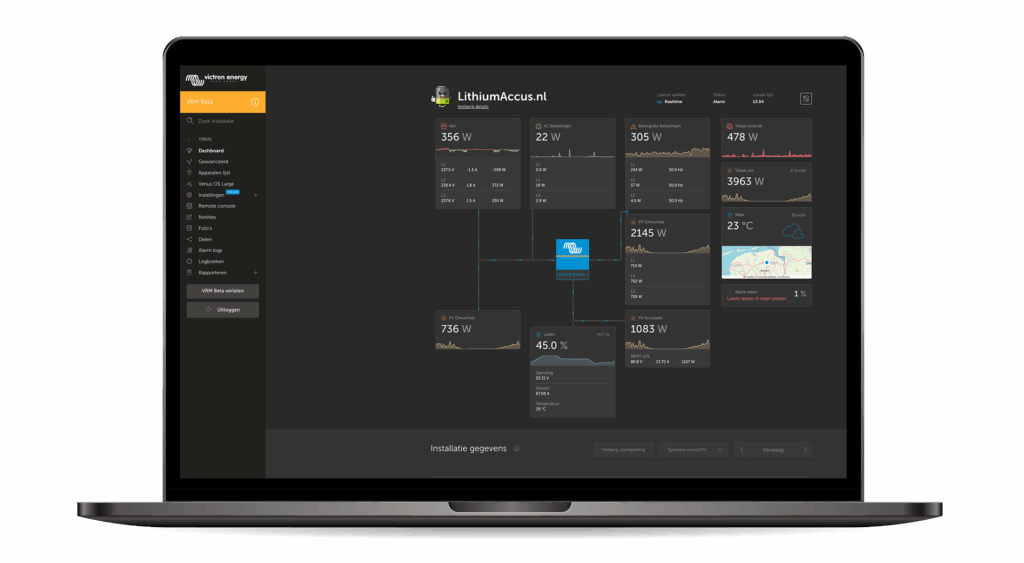
Follow available measurements of grid import, export, generation, battery and consumption.
Compare historical data and recognise patterns in generation and consumption.
Receive configured system notifications. Availability depends on your configuration and connection.
In VRM, you view available measurements, history and notifications. Regilo EMS uses measurements, configured limits and the agreed strategy to control supported devices. Insight and energy control work together, each with its own role.
Explore energy controlsYour installer agrees with you who may view data, which notifications are needed and who may change settings. Changes and support requests stay with the installation in Re.Connect. Available information and control depend on devices, configuration and subscription.
We recommend view-only access in VRM for end users. Administration and settings changes belong with authorised administrators and installation partners.
Your installer uses Re.Connect to prepare and configure the installation and activate the agreed operation. See how installation with Re.Connect works.
Current remote data, synchronisation and notifications are limited or unavailable. Only supported and configured local controls may continue.
No. The standard subscription does not include 24/7 supervision or guaranteed response and resolution times. Contact your installer or service partner first if a fault occurs.